Every enquiry gets a reply within 2 minutes, even while you are on a job.
DayThree CRM answers your WhatsApp from your own prices, books the visit, and buzzes your phone when it needs you.
S$99 a monthor S$990 a year. Free for your first 3 months with a DayThree Launch Page. Cancel any time.
Cedar Lane Aircon
online
Example chat with a sample business.
Hi, how much to service 3 aircon units? Can you come this Saturday?9:12 pm
Hi Grace, I'm the assistant for Cedar Lane Aircon. General servicing is S$25 a unit for 3 or more, so S$75 for all three. Saturday has 10am or 2pm free. Which suits you, and what is the address?9:12 pm
2pm please. Blk 123 Tampines St 119:14 pm
Booked for Saturday at 2pm, Blk 123 Tampines St 11. You'll get a reminder the day before. Anything else I can help with?9:14 pm
What kind of business do you run?
Pick yours, and the examples on the rest of this page change to match.
What happens when a business receives an enquiry at 9:12 pm on a Thursday night.
Without it
Hi, how much to service 3 aircon units? Can you come this Saturday?9:12 pm
Next morning
Hi! So sorry for the late reply, I was on a job till late. Still need the servicing?7:04 am
It's ok, I booked another company last night. Thanks anyway7:10 am
With DayThree CRM
Hi, how much to service 3 aircon units? Can you come this Saturday?9:12 pm
Hi Grace, I'm the assistant for Cedar Lane Aircon. General servicing is S$25 a unit for 3 or more, so S$75 for all three. Saturday has 10am or 2pm free. Which suits you, and what is the address?9:12 pm
2pm please. Blk 123 Tampines St 119:14 pm
Booked for Saturday at 2pm, Blk 123 Tampines St 11. You'll get a reminder the day before. Anything else I can help with?9:14 pm
This is a sample business. Your AI assistant can be customised and trained to speak the way your team does.
When it doesn’t know, it asks you.
It only replies with the services, prices and answers you’ve given it. If a customer asks something you haven’t taught it, or wants to talk to a real person, it tells them someone will reply and hands the chat to you. Your phone buzzes on Telegram with who’s asking and why.
You reply from your own phone, in the same WhatsApp chat. If it ever gets a reply wrong, correct it once and it’ll remember next time.
Oh, do you also install new aircon? I need one for the bedroom.9:16 pm
Let me get a colleague to help with this. They'll reply here soon.9:16 pm
You, from your phoneHi Grace, yes we do. I can take a look on Saturday when we service the other three.9:31 pm
🙋 Assistant handed over a chat
Grace Leong on WhatsApp
Why: asked something it does not know
Asking if you install a new aircon for the bedroom.
Open the chat
Set up for your kind of business from day one.
Pick your kind of business and your account comes ready to use, in one tap.
There are 11 starter kits, from salons and tuition centres to car workshops.
Home services
Air-con servicing, cleaning, home movers
- Jobs pipeline
- Get a quote form
- Service visit booking page
- 5 WhatsApp quick replies
- 9 follow-ups, ready to switch on
Open it and know exactly who to chase.
Every enquiry lands in one list, on your laptop or your phone.
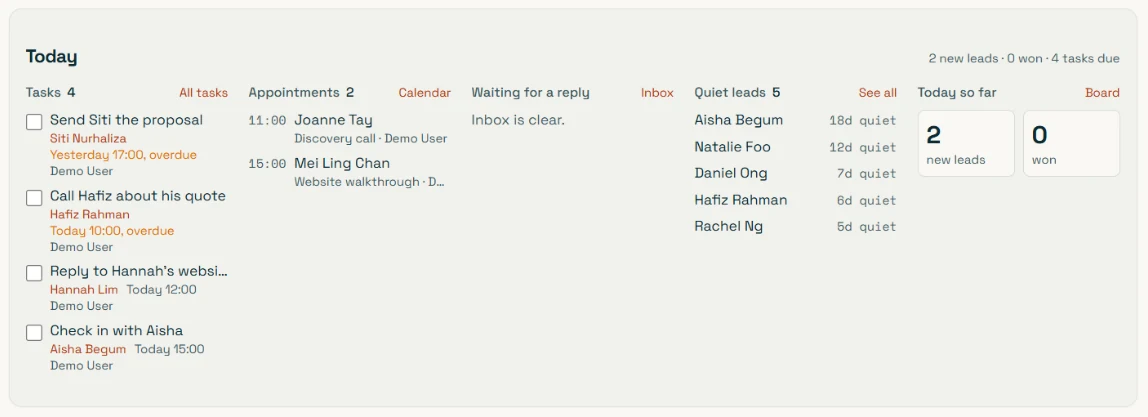
These five went quiet. Start with the oldest.
What’s due, and who’s waiting.
Tasks, today’s appointments and unanswered chats, on one screen.
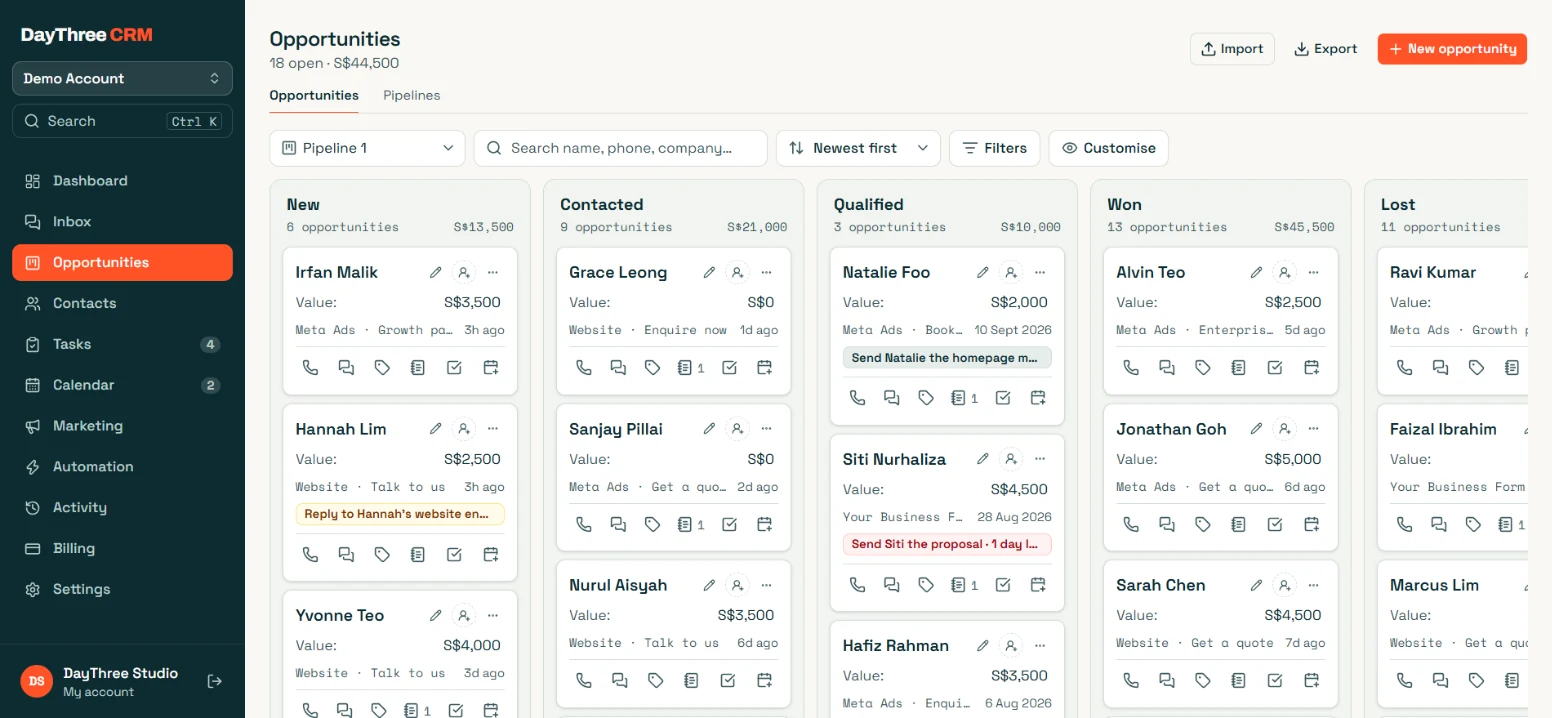
Every open job on one board.
See what each job is worth and where it came from.
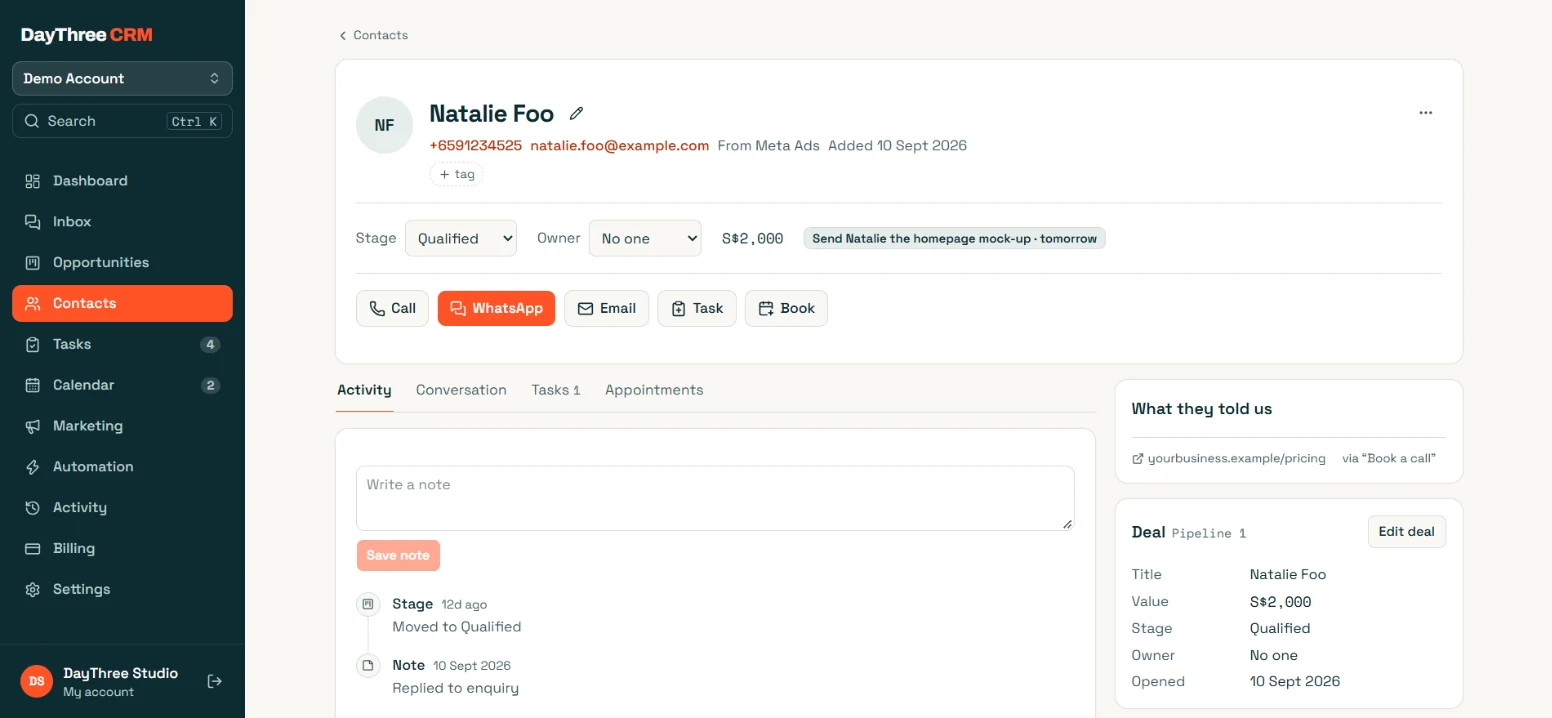
It keeps the ad that brought them.
Everything about a customer, in one place.
Know where your customers come from.
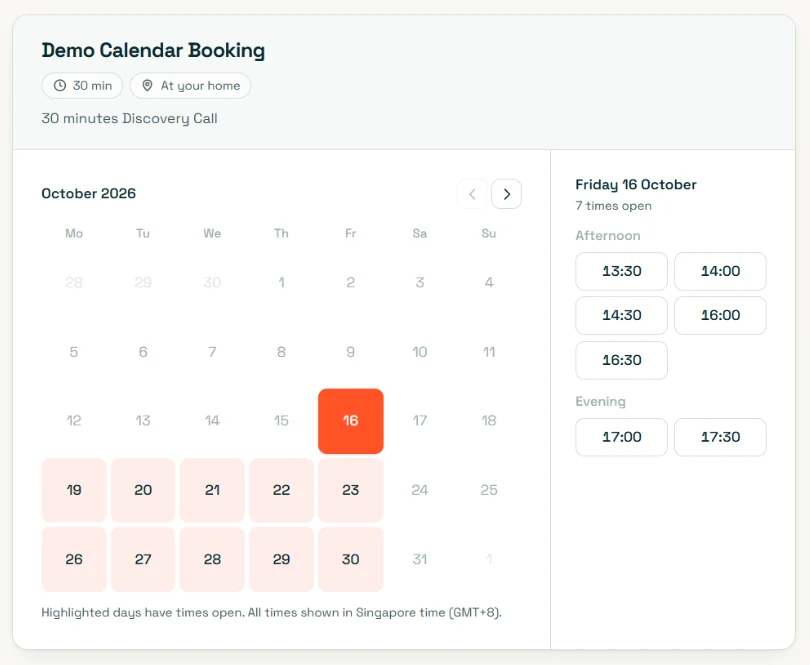
Customise your booking page.
Customers book an available slot, and get reminders as the date gets closer.
Ask your own AI about your business.
Connect the CRM to your ChatGPT or Claude, then ask in plain words. It reads your enquiries and chats, and answers from them.
- Included in the S$99. It runs on your own ChatGPT or Claude account, and I switch it on for you.
What did my customers say this week?
Read this week’s enquiries and chats in DayThree CRM
Most wanted a price and your earliest free slot. Two things stood out:
- Three asked about a service that isn’t on your price list yet. Add it, and the assistant can quote it next time.
- Two went quiet after your quote. They’re on today’s follow-up list.
How do I improve my closing rate?
Read your lost jobs and their chats in DayThree CRM
Most of the jobs you lost this month went the same way: the customer asked a question, you answered it, and they stopped replying. Two changes would help:
- End each reply with a question that’s easy to answer, like “Saturday 10am or 2pm, which works for you?”
- Follow up quickly when someone goes quiet after your reply. Switch on the quiet-lead follow-up and it sends them a WhatsApp nudge for you.
It runs in Singapore, so it’s fast.
Your enquiries, chats and customer records are stored in Singapore, and the CRM runs there too. So pages load fast, even with thousands of enquiries.
- Where your data is stored
- Singapore
- Where the CRM runs
- Singapore
- Taking it with you
- Export to a spreadsheet any time
About 16 times quicker to load.
The same request to the same service in each place, timed from a home internet connection in Singapore, October 2026.
How you get it.
-
Book a free 30-minute chat.
Tell me where your enquiries come from today and which ones wait overnight. If a spreadsheet and the WhatsApp Business app are enough for you right now, I will say so.
-
I set it up around your business.
I start from the Home services kit, put in your services, prices and hours, and connect your WhatsApp number with you. The follow-ups stay paused until you switch them on.
-
Your enquiries get answered.
It goes live with your new Launch Page. Your customers get a reply in minutes, and you get a buzz when one needs you.
You get everything on this page for S$99 a month.
Many CRM and chatbot tools only show their price after a sales call, then charge extra for the AI. Here is how they compare.
| What you need | Bought separately | DayThree CRM |
|---|---|---|
| A CRM | about S$115 a month | S$99 a month for both |
| WhatsApp automation | about S$159 a month | |
| An AI chatbot | often US$99+ a month, used or not, with caps or extra fees | Only what you use: about S$5 to S$20 a month for around 100 enquiries |
| The price | often only after a sales call | Transparent S$99 a month, on this page |
Bought separately: published plans for a small business with 5 staff and one location, September 2026. AI cost: worked out from real enquiries in the CRM on GPT-5.4 mini, October 2026.
For the AI assistant, you add your own ChatGPT, Claude or Gemini key, and I walk you through it. You pay the AI company only for what it uses, at their price. No markup from me, and no paying for things you don’t need.
Here is everything the S$99 includes.
DayThree CRM
For service businesses that want every enquiry answered, even after hours.
- The AI assistant on your WhatsApp, on your own ChatGPT, Claude or Gemini account, with a monthly limit you set
- 18 ready-made follow-ups: reminders, confirmations and review requests
- An alert for every enquiry on Telegram, WhatsApp or Slack, and a 9am list of what is due
- Facebook, Instagram and Google Ads linked, so each enquiry shows what it cost
- Today panel, board, contact records and booking page
- Your own ChatGPT or Claude, connected so you can ask about your business
- The Home services starter kit, set up for you
- Your data stored in Singapore, and yours to export any time
DayThree CRMS$99 a month
Or pay for the yearS$990 a year
Free for the first 3 months with a DayThree Launch Page (the S$1,800 website)
Or try it on WhatsApp first. Cancel any time.
The AI company bills you directly for what the assistant uses, at their price, with no markup from me. Already have a website? I take a look at it first, then quote you for adding the CRM to it.
Frequently asked questions
Is it an app I have to install?
No. It's a web app at crm.daythree-studio.com that works on a laptop or your phone, and you can add it to your home screen like an app. Nothing to install or update. Alerts arrive as notifications with the message in them, so you don't need to keep it open.
Do I have to change my WhatsApp number?
No. It works from the WhatsApp number your customers already know. Replies, confirmations and reminders go out from your number, and you keep answering from your phone as usual. I set it up with you on our call.
Is there an AI that replies for me?
Yes, if you want one. Without it, the CRM sends the messages you'd send yourself if you had time: request received, booking confirmed, reminders, and a thank-you with your review link. Switch on the AI assistant and it also answers questions, quotes from the prices you give it and books visits, any time of day. It says it's an assistant, hands the chat to you when someone asks for a person or something it hasn't been taught, and never messages anyone first. It runs on your own ChatGPT, Claude or Gemini account with a monthly spending limit you set.
Can my team use it too?
Yes. Everyone gets their own login. You can assign enquiries to whoever is handling them and hand a chat to a colleague with a note only your team sees. You decide who can change settings and who can only handle enquiries.
Can I bring in the contacts I already have?
Yes. Import a spreadsheet of names, numbers and emails, and any extra columns come along too. You can export the same way any time, so your list is never stuck.
What does it cost?
With a Launch Page it's free for your first three months, with everything switched on, then S$99 a month or S$990 a year. Already have a website? I take a look at it first, then quote for adding the CRM to it. Cancel any time. The AI assistant runs on your own AI account, so you pay the AI company directly, at their price, with no markup from me.
Can automated WhatsApp get my number banned?
It can if it acts like spam, so this one doesn't. The first reply waits a minute or two, each customer gets only a few automated messages a day, nothing is sent twice into silence, and it stops the moment someone replies or says stop. Your forms ask permission to WhatsApp them, and anyone who opts out stays out.
What happens if I stop?
You export your contacts, the automation stops, and your website keeps working as before. There's no fee to get your data back. Your workspace is then closed and its data deleted within three months, as the privacy policy says.
What does connecting my Google Calendar do?
Connecting your Google Calendar is optional and switched on by each person for their own calendar, under Settings, then Integrations. It does two things.
- It stops double bookings. The CRM asks Google when you are busy so those times are never offered on your booking page. Google returns start and end times only. No titles, no guests, no locations, nothing about what the meeting is, and none of it is stored.
- It puts bookings in your calendar. A new appointment appears as a real event, updates if it moves, and cancels if it is cancelled. It never touches an event it did not create.
Disconnect it in the CRM, or remove access from your Google account, and it stops immediately. The full detail is in the privacy policy.
What does connecting my Gmail do, and can it read my mail?
Connecting Gmail is optional and done by the business owner or an admin, under Settings, then Integrations, then Email. Here is what it does, and what it cannot do.
- Email to your leads comes from your own address. When you send an email from a lead's page, or one of your automations sends a follow-up, it goes out from your Gmail and sits in your Sent folder like any email you write. The CRM asks Google for one permission: to send email.
- It cannot read your mail. It never opens, lists or searches your inbox, sent mail, drafts or contacts. Replies arrive in your Gmail as normal and stay there.
Disconnect it in the CRM, or remove access from your Google account, and it stops immediately. The full detail is in the CRM privacy policy.
What does connecting my Facebook, Instagram or Google Ads do?
Connecting your ads is optional and done by the business owner, under Settings, then Integrations. For Facebook and Instagram you sign in with Facebook and tick the Page and ad account to share. For Google Ads you sign in with the Google account you use for Google Ads and pick the account, or accept a link request from DayThree's manager account. It does three things.
- Your lead forms come straight in. When someone fills in one of your Facebook or Instagram lead forms, the lead is in the CRM within seconds, with the campaign, ad set and ad it came from, so you can reply while they are still holding their phone.
- You see what a lead costs. Every night the CRM reads your ad spend, clicks and results from Facebook and Google, and the dashboard divides spend by leads. It reads figures only. It never creates, changes or pauses an ad.
- Google Ads leads keep their click. A lead from a Google ad arrives with its click id, so the campaign and keyword that brought it are on the record.
The CRM sees only the Page and ad accounts you tick, and only for your own business. Disconnect it in the CRM, or remove DayThree CRM under Integrations in your Meta Business settings, and it stops. The full detail is in the CRM privacy policy.
Want to see it with your own business in it?
I’ll show you the real thing, set up with your own services and prices. No pitch, no obligation.
Usually reply on the same day.